CRM KitsCounseling and therapy practices
Every enquiry answered. Every opening filled.
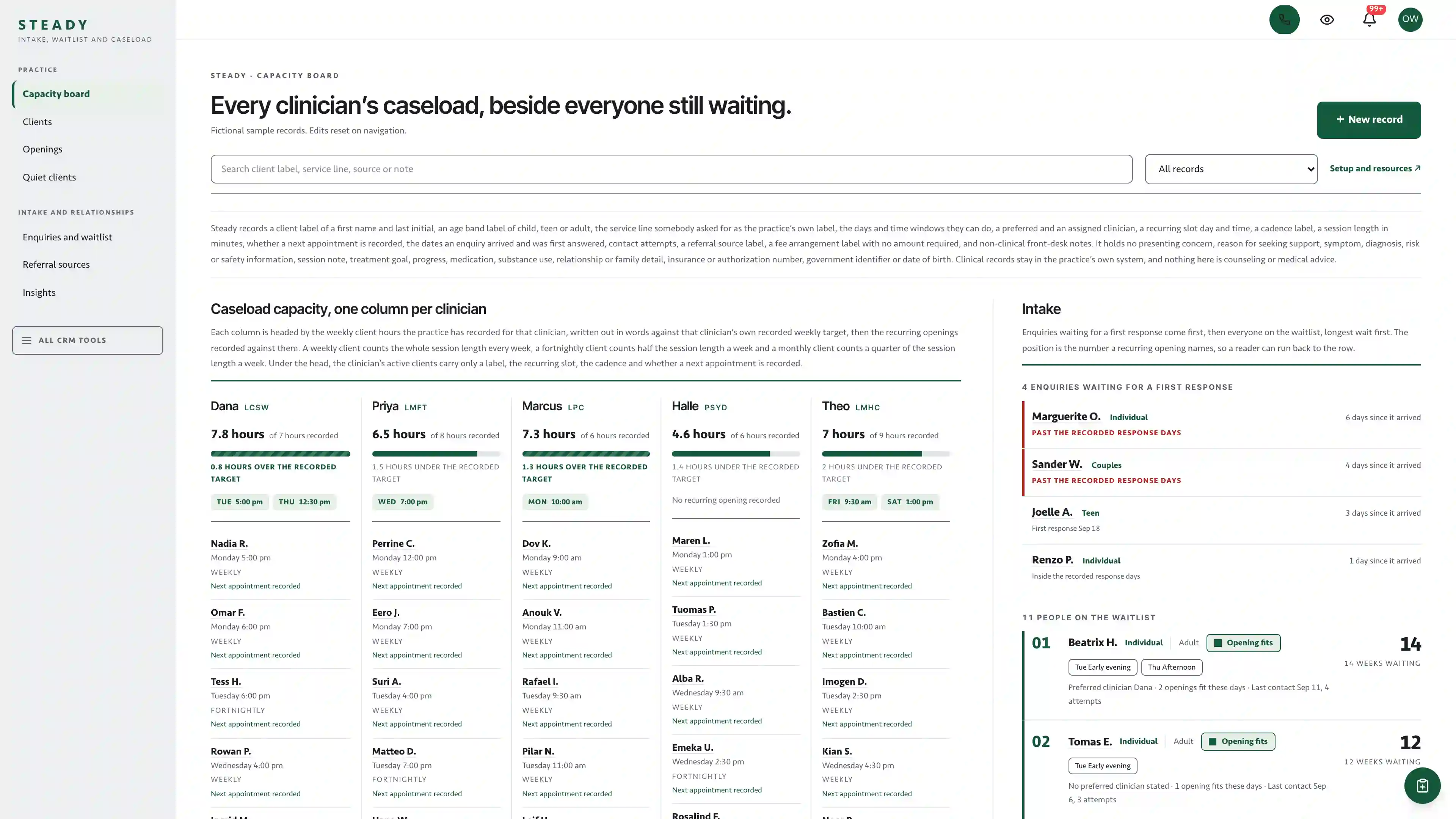
A caseload capacity board read against the intake list. One column per clinician with the weekly client hours the practice recorded against that clinician’s own target, the recurring openings beside them, and on the other side every enquiry still waiting for an answer and everybody on the waitlist. Steady keeps the intake, the waitlist and the caseload in one calm workspace.
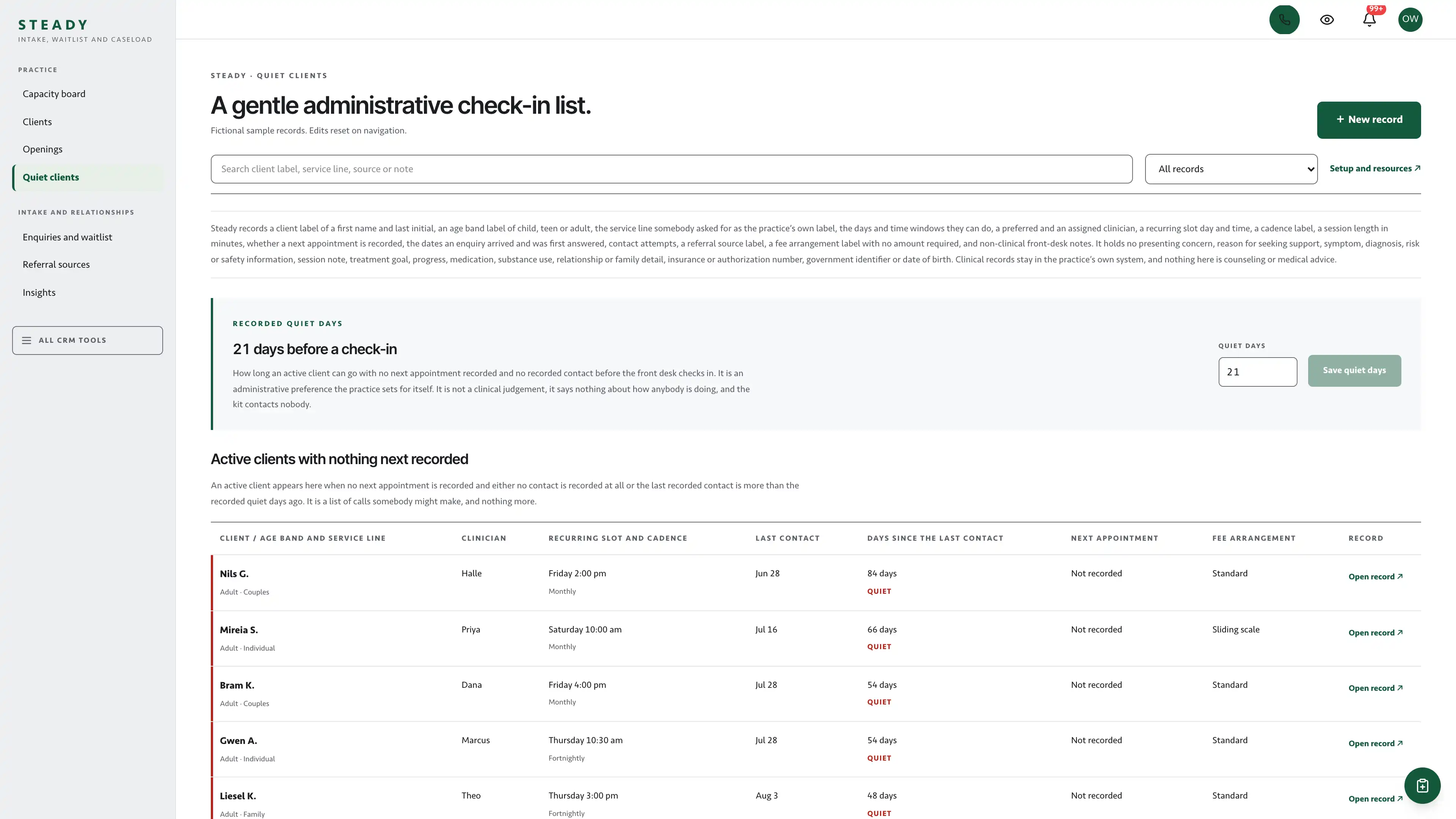
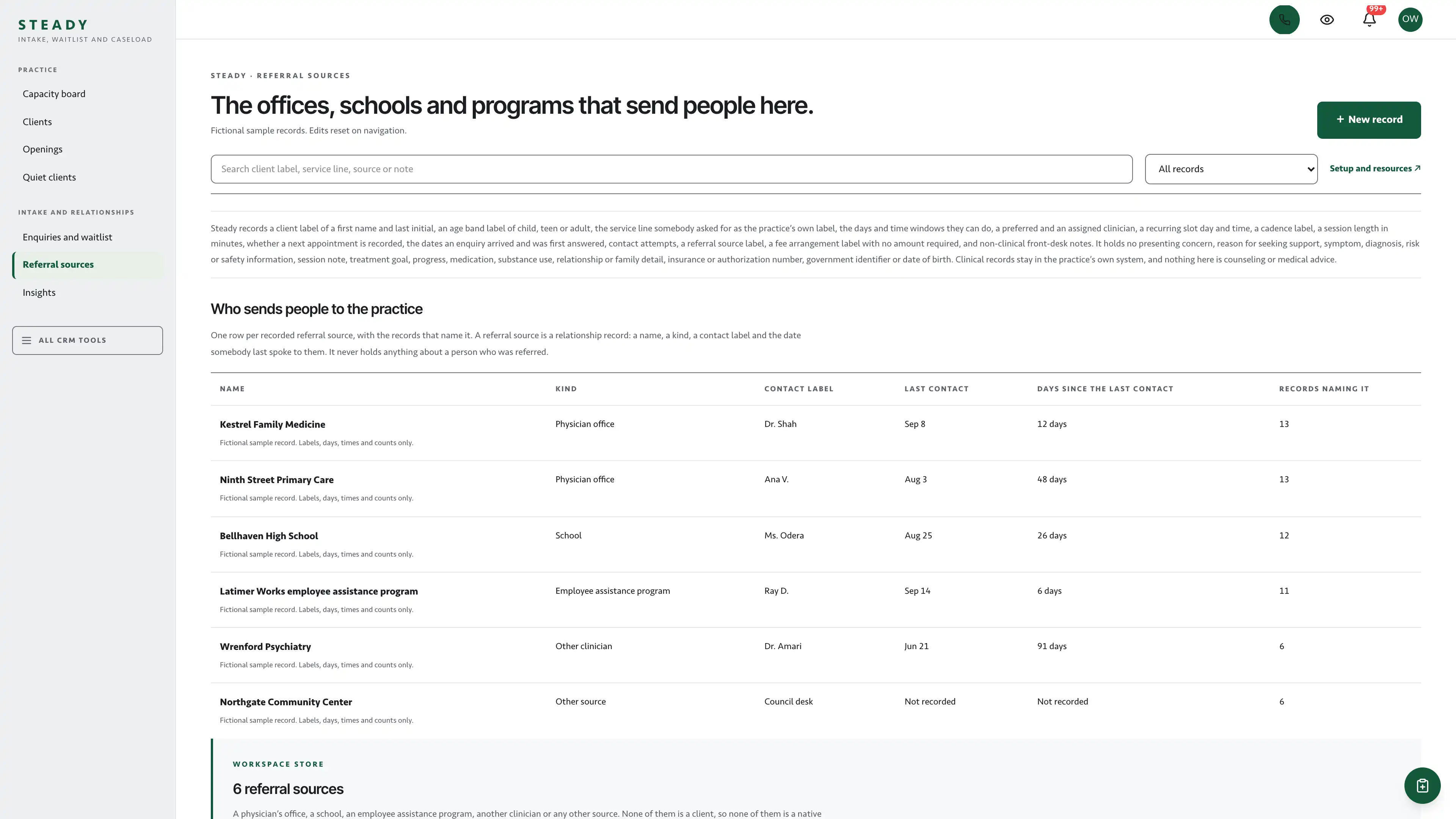
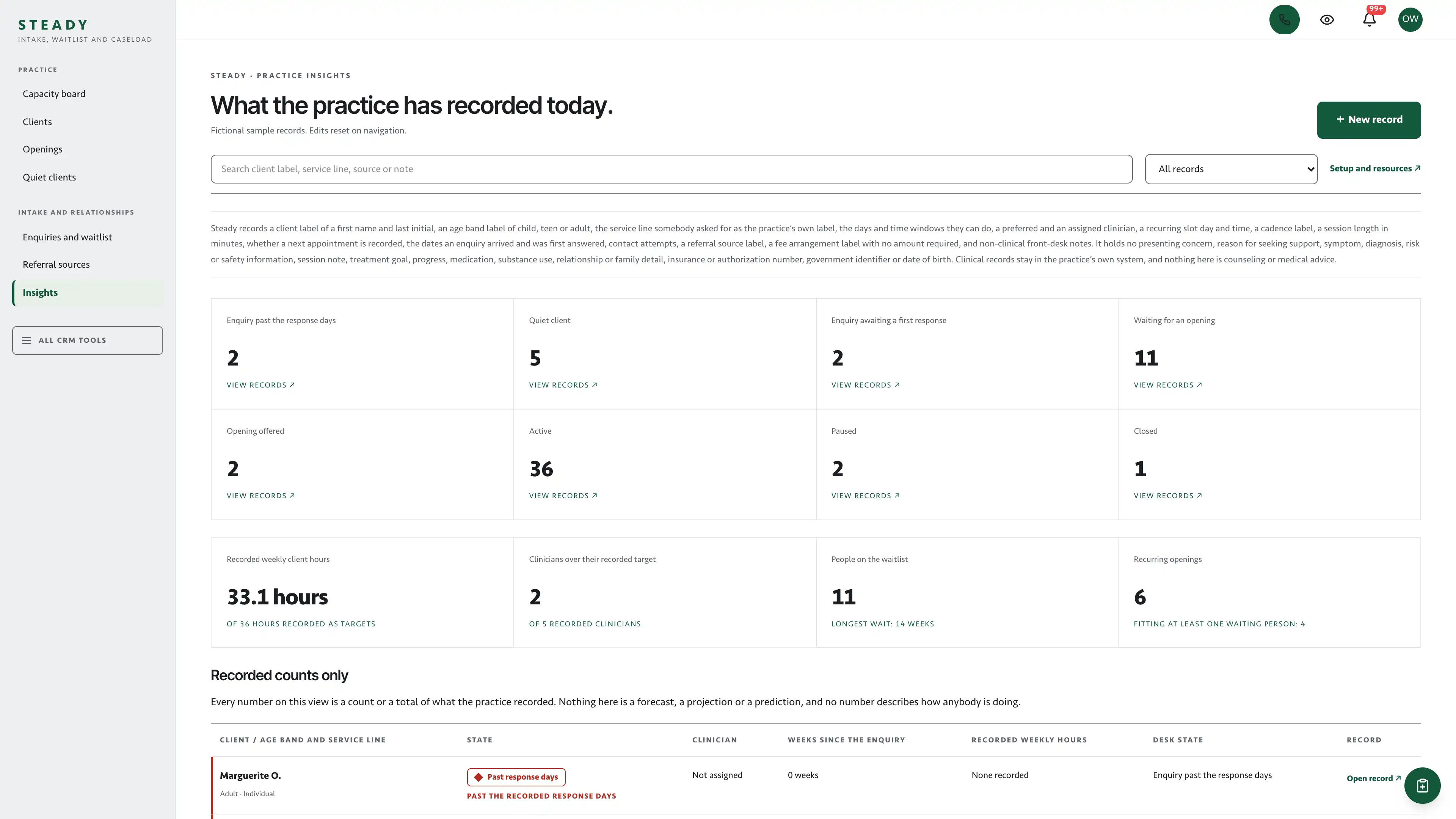
Who has room, and who is still waiting.
Each clinician column writes its recorded weekly client hours out in words against that clinician’s own recorded weekly target, then lists the recurring openings recorded against them and their active clients as minimal rows. Beside the columns, the enquiries still waiting for a first response come first, then the waitlist, longest wait first.
Actual interface captures with fictional sample data. Open a screenshot to see it full size.
What’s in the kit
Screens
- Caseload capacity board with clinician columns and the intake list beside them
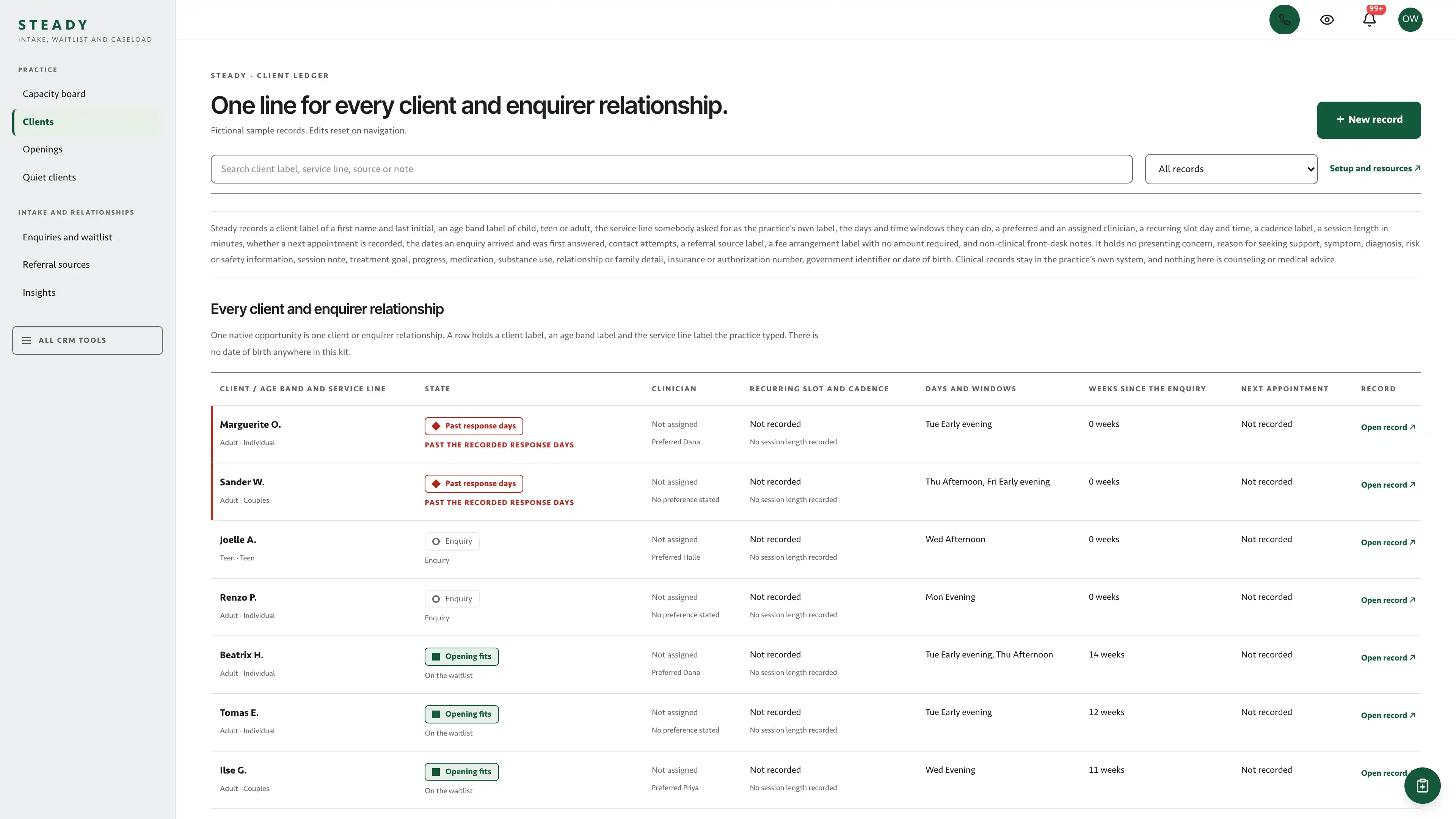
- Clients ledger operating view
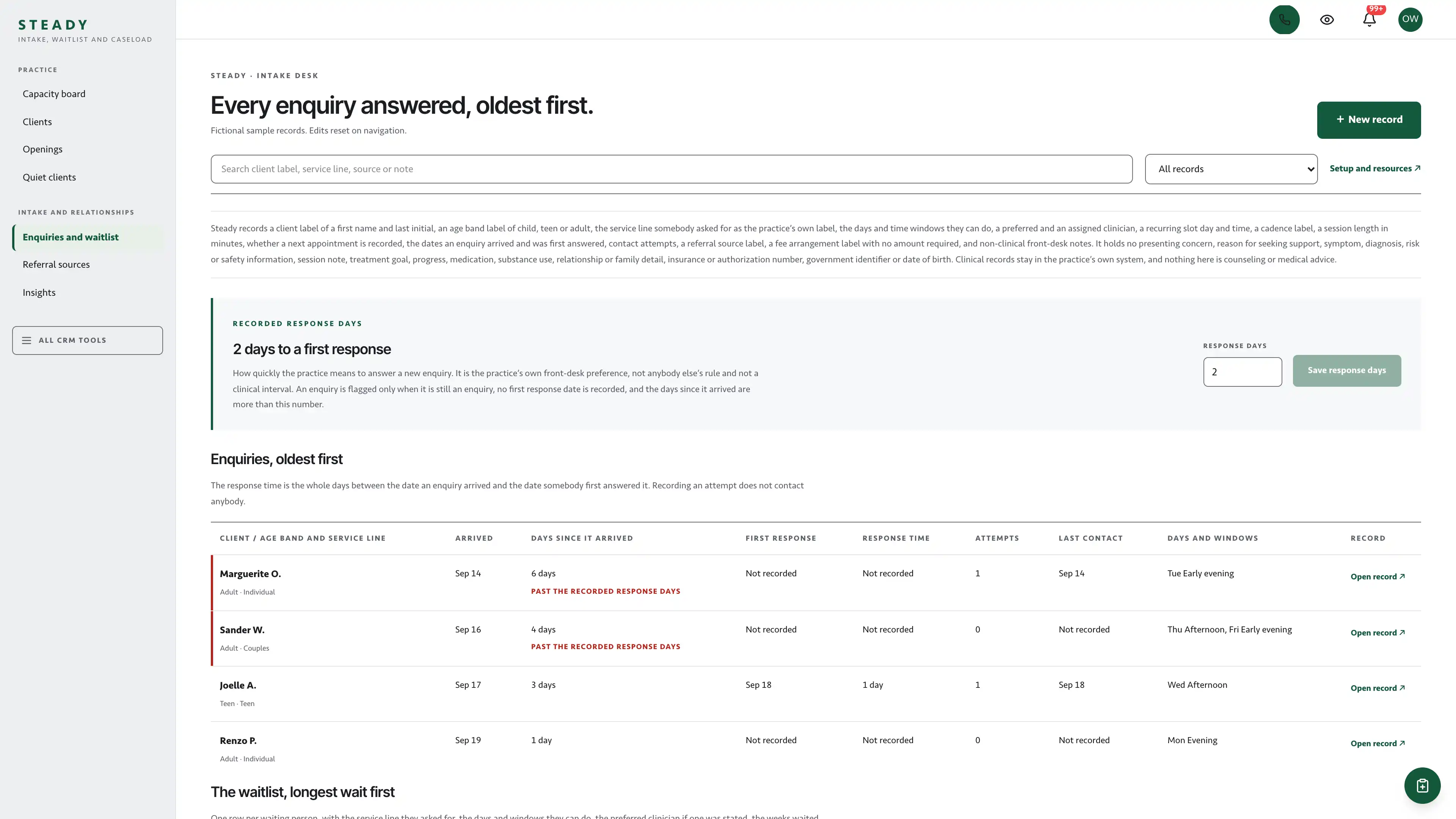
- Enquiries and waitlist operating view with the recorded response days
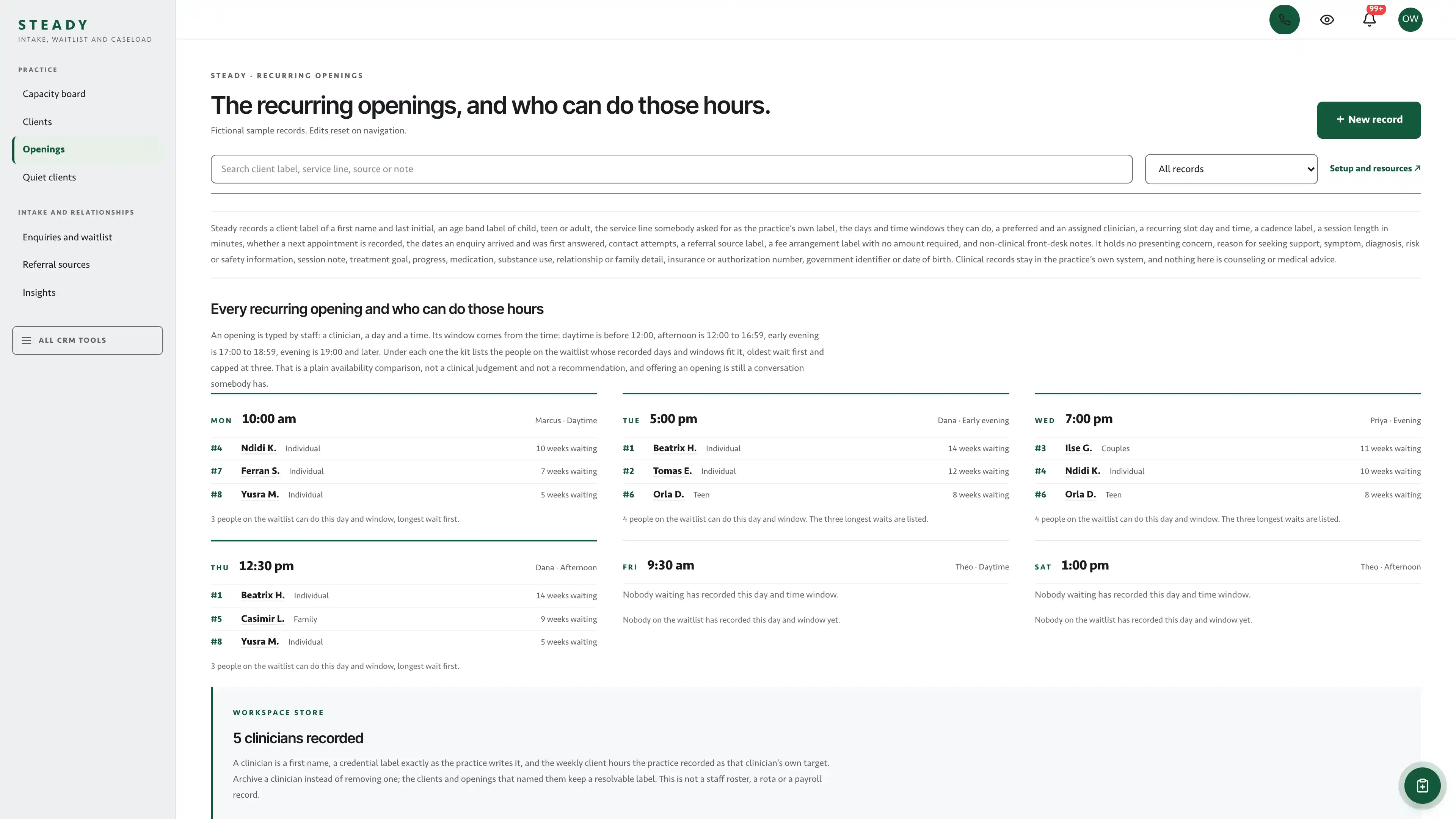
- Recurring openings operating view with the clinician and opening editors
- Quiet clients operating view with the recorded quiet days
- Referral sources operating view
- Insights operating view of recorded counts only
- A workspace store for the clinicians, their openings, the referral sources and the two recorded day counts, behind one revision guard
- Three native form drafts and three editable document templates
- Editable per-record checklists and preserved row history
four pipelines
- Client relationships · 7 stages
- Enquiry responses · 7 stages
- Recurring openings · 7 stages
- Referral sources · 8 stages
Optional. Install the ones that match your work, or connect drafts to a pipeline you already use.
nine workflow drafts
- New enquiry response task
- Second response attempt
- Waitlist welcome note
- Waitlist check-in after a wait
- Opening offered task
- Offer follow-up after a wait
- First appointment booked note
- Quiet client administrative check-in task
- Referral source thank-you task
Inactive until you review and publish them. None send customer messages.
Forms and documents
- Counseling enquiry: name, email, phone, then the kind of appointment, the days, the time windows, a preferred clinician, the best way to reach you and whether a voicemail may be left, all as fixed choices
- Availability update: name, email or phone, the days and time windows that now work, and whether to pause a place on the waitlist
- Practice feedback: two star ratings and five single-choice questions about scheduling and communication, with no comment box
- Waitlist call sheet
- Opening offer letter
- Administrative check-in call sheet
Editable native forms and document templates. Forms collect information for staff review.
Sample workspace
Explore 61 fictional records: 4 enquiries of which 2 are past the recorded response days, 11 people on the waitlist with the longest at 14 weeks, 2 with an opening offered, 41 active clients, 2 paused and 1 closed. Five fictional clinicians, two of them over their own recorded weekly target and one with no recurring opening recorded, six recurring openings of which four fit at least one waiting person, five quiet clients and six referral sources. Sample edits stay in memory and reset on navigation or reload.
No sample customers are added to your CRM.
Setup and source
- Guided setup and compatibility report
- Private rollback receipt
- AI-agent guide for customized installations
- Original editable source, configuration, and tests
Please read
A front-desk workspace, not a medical record.
- This kit is not a HIPAA compliance product and does not make a practice HIPAA compliant. It is not an EHR, EMR or practice management system.
- It is built for relationship work: recalls, reminders due, follow-up, intake progress and front-desk tasks. Clinical notes, diagnoses, prescriptions, test results, insurance details and other protected health information belong in your clinical system, not here.
- You install the kit on your own Seedly CRM. DevLaunch does not host, receive or process your patient data. Your practice decides what it records in its CRM and is responsible for its own privacy, security and regulatory obligations, including any agreements with its hosting and software providers.
How setup works
Full installation guideCheck your Seedly
Extract the kit and run the guided setup. It checks your installation and flags customized files before it changes anything.
Connect the helper
Deploy the included helper from your backend source, then build your web app and choose any starter pipelines and drafts.
Make it yours
Set practice name, descriptor and default pipeline name. Then sign in and check the workflows and permissions your team uses.
Technical details and compatibility
Seedly CRM 5.8.4 · extension API 1. Node.js 20 or newer. The installer checks supported integration-file versions and does not deploy your web app or backend. The included original backend helpers are required for connected record creation, edits, the workspace store and resource setup. They preserve native account permissions, unrelated custom fields and row history, run the boundary guard on the server, and check revisions before saving. Deploy them from the authoritative backend source. Pipelines and workflow drafts are optional.
One contact-linked opportunity is one client or enquirer relationship. It holds the client label of a first name and last initial, the age band label, the service line as the practice’s own label, the stage with the date it was reached, the date the enquiry arrived and the date it was first answered, the contact attempts and last contact, the preferred and assigned clinician, the recurring slot day and time, the cadence label, the session length in minutes, whether a next appointment is recorded and its date, the referral source label, a fee arrangement label with no amount required, availability rows of a day and a time window, and an editable checklist. The clinicians with their own recorded weekly targets, their recurring openings, the referral sources, the recorded response days and the recorded quiet days live in one account store behind a single revision guard.
Weekly client hours are the sum of recorded session lengths over a clinician’s active clients, counted once a week for a weekly client, as one half for a fortnightly client and as one quarter for a monthly client, held in quarter-minutes so the three cadences total exactly. An opening’s fits are a plain availability comparison: the waitlist stage, the same day and the same time window, sorted oldest wait first and capped at three. Nothing is weighted, scored or decided for you, there is no clinical or suitability judgement, and offering an opening is still a conversation somebody has. This is the most careful kit in the collection and it records less than any other: no presenting concern, reason for seeking counseling, symptom, diagnosis, risk or safety information, session note, treatment goal, progress, medication, substance use, relationship or family detail, trauma history, school or employer detail beyond a referral source’s name, insurance or authorization number, government identifier or date of birth, and it holds no monetary field at all. A server-enforced guard refuses free text that looks like any of those in every field and every non-name label, which is help against accidental entry rather than a guarantee. There is no scheduling engine or calendar sync, no insurance, superbills or billing, no automated reminder or message of any kind, no client portal, no payments, no telehealth, and no crisis or emergency service: the enquiry form says so and carries a crisis line. None of the three public forms has a message box. A submission lands as a native Seedly form record, so it never passes through the kit’s guard, and an open box on a counseling form would be the one place a reason for seeking support could be typed and stored: every question other than a name, an email address and a phone number is a choice from a fixed list or a star rating, no form has a textarea and no form has a file field, and each form says “This form has no message box on purpose.” The kit gives no clinical or mental health advice.
Four optional pipeline templates and nine inactive workflow drafts. 61 fictional in-memory records with 5 clinicians and 6 recurring openings.
Calling, messaging, signing, payments, and external integrations depend on your Seedly installation, account permissions, plan, and configured providers. Screenshots use sample data and reference imagery. Hosting, installation, and ongoing maintenance are your responsibility.
Get the Counseling Practice Kit
Checking access…

DevLaunch All Access
Every kit and every template.
- All 220 CRM kits for Seedly CRM
- All 270 website templates for Seedly Sites
- Every class, course, and product we release, added as it ships
- Private calls with Aaron
Already a member? Open your downloads.
Questions
Is this kit HIPAA compliant?
No, and it does not claim to be. It is not a HIPAA compliance product, an EHR or a practice management system, and installing it does not make a practice compliant. It is a front-desk and relationship workspace for recalls, reminders, follow-up and intake progress. Keep clinical notes, diagnoses, prescriptions, test results, insurance details and other protected health information in your clinical system. The kit runs on your own Seedly CRM; DevLaunch does not host, receive or process your patient data, and your practice remains responsible for its own privacy, security and regulatory obligations.
How do I receive the kit?
Purchase securely through Whop. Your original source ZIP and installation documentation are delivered manually to the email used at checkout. This is a one-time purchase of this kit; Seedly software, hosting, and installation services are separate.
Does this include Seedly CRM?
You obtain and configure Seedly separately. The kit adds original frontend screens, a shared theme, starter definitions, and integration instructions. It does not include Seedly’s codebase, license, hosting, or a separate CRM database.
Is this one connected workspace?
Steady keeps its soft cool grey left rail across the kit views and native CRM tools in the same signed-in account, on a white canvas with hairline separators and no boxed cards. Contacts, Calendar, Estimates, Documents, and other full modules retain the functionality supplied by your own Seedly installation. Existing authored content and provider screens retain their own layouts.
Can I use it with existing customizations?
Yes, with a compatibility review. The installer checks the supported integration files. Changed integration files need a reviewed merge; the included AI-agent guide explains how to preserve custom extensions, permissions, providers, and routes.
Do I have to import all the starter content?
No. Choose individual pipelines and workflow drafts, use a compatible existing pipeline, or install none. Workflows remain inactive until reviewed and published. They use native triggers, internal tasks, optional notes, and timed waits. A wait does not verify task completion or recheck the current stage. The included drafts do not send customer messages.
Can I remove the examples and starter content?
Sample records stay in memory and never create customers in your CRM. Leave sample mode to return to your account. Starter setup lets you review removal of unused kit additions; server checks retain edited or published workflows and pipelines with live work or references. Removing the frontend does not delete account records.
Can different subaccounts use different kits?
The current design and branding apply to the whole web installation. Subaccounts still separate data and access. Use a separate web installation for another full-interface kit; running different kit designs by subaccount in one installation requires additional customization.
More health, beauty & wellness kits
Browse all 220 kits